
For years, my blogs were a mess. Not a mess in the sense that the writing was bad. A mess in the sense that nothing connected. I’d publish a post about one thing, then another post about something entirely different, then something else.
Whatever felt interesting that week. Whatever I felt like writing.
Nothing ranked.
Nothing built on anything else. The blog existed. That was the most you could say for it.
The shift wasn’t discovering a better writing system or a fancier tool. It was a simpler realization: I was writing posts when I should have been building a map.
Now I don’t write a single post without knowing where it fits in a bigger structure. I map the whole thing first. How each post connects to the next, how they funnel into something larger.
I do all of that before I write a word. That’s the difference. Google or even your first-time reader sees a focused, connected body of content instead of a scatter of random ideas.
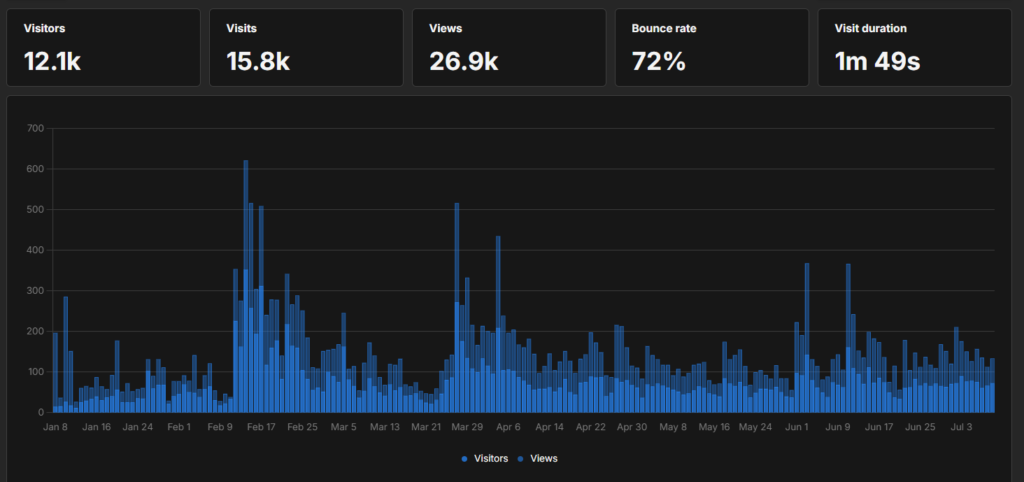
It’s the exact approach I used on my blogs. Six months in, it’s crossed 25,000+ page views not because any single post went viral, but because the posts were built to feed each other from day one.
Your first 10 posts aren’t 10 ideas. They’re a structure. That’s the only frame that matters.
The Short Answer
Plan your first 10 posts around one core topic, and give each post a job. The split that works:
- 1 foundational post that frames the topic
- 4 how-to posts that answer what people are actually searching
- 2 mistake posts that catch problem-aware readers
- 2 comparison posts for people weighing options
- 1 proof post where you show a real result
Ten posts, five roles, one topic. That makes your blog look focused and authoritative to Google from day one, gives you internal links to build between the posts, and stops you publishing scattered content that never gets traction.
It’s a mini topical cluster.
That’s the framework. The rest of this article is how to actually use it.
Why “Post Ideas” Is the Wrong Way to Start
Most advice about your first blog posts goes like this: here are 100 ideas to get you started. Pick something. Just write.
That advice deepens the problem. Because the problem isn’t that you don’t have ideas. It’s that you have too many unconnected ones, and none of them build toward anything.
Google doesn’t just rank individual posts in isolation. It looks at whether your blog is a credible source on a topic, and credibility, in Google’s view, comes from coverage: a body of content that approaches a subject from multiple angles, where posts reinforce each other.
A blog that publishes one post about budgeting, one about book reviews, and one about morning routines sends a clear signal to Google: this site doesn’t really know what it’s about. Google buries it.
A blog that publishes ten focused posts about budgeting for beginners, each doing a different job, linking to each other? That signals authority. Google pays attention.
This is what topical mapping does at scale. Your first 10 posts are just a miniature version of the same idea.
Scattered loses. A focused, connected set wins, for both Google and readers.
The 5 Post Types You Should Cover
The mistake isn’t picking bad topics.
It’s picking ten posts that all do the same job, usually ten how-to posts stacked on top of each other.
A real cluster has range. Each post is a different type, plays a different role, catches a different kind of searcher, and covers your topic from a different angle.
Here are the five post types, and how many of each you want in your first 10:
| Post type | Posts | The job it does | What the reader typed into Google |
|---|---|---|---|
| Foundational | 1 | Frames the whole topic. The hub every other post links back to. | “what is X”, “why does X matter” |
| How-to | 4 | Answers the specific tasks your reader is stuck on. Most of your early traffic lands here. | “how to X”, “how much X”, “how do I X” |
| Mistake | 2 | Catches problem-aware readers before or after they mess up. Easy to rank, high trust. | “why X fails”, “X mistakes”, “is X bad” |
| Comparison | 2 | Helps someone choose between two options. Lower competition, converts well. | “X vs Y”, “which is better” |
| Proof | 1 | Shows a real result you got. The trust post, the one only you can write. | “does X work”, “X results”, “I tried X” |
That adds up to ten.
Notice the shape of it. One post to anchor the topic, a fat core of four how-to posts to pull in search traffic, then four posts that build trust and catch readers the how-to posts miss, plus one that proves you’ve actually done the thing.
The old advice gives you version one: ten how-to posts of the same type. This gives you a blog. The difference is the last three types.
Mistake posts rank fast because most beginners are anxious and search their fears. Comparison posts convert because the reader is already deciding. And the proof post is the only one a competitor can’t copy, because they didn’t live it.
What the First 10 Look Like Mapped Out
Abstract roles are easy to nod along to and hard to use.
So here’s the same framework filled in for one real topic: budgeting for beginners.
Ten posts, each tagged with its type and the posts it links to.
| # | Post title | Post type | Links to |
|---|---|---|---|
| 1 | What Is Zero-Based Budgeting (And Why Most People Budget Wrong) | Foundational | hub — every post links here |
| 2 | How to Make a Budget When You Live Paycheck to Paycheck | How-to | 1, 3 |
| 3 | How to Stick to a Budget for the First 30 Days | How-to | 1, 2 |
| 4 | How Much Should You Spend on Groceries? A Beginner’s Guide | How-to | 1, 7 |
| 5 | The Easiest Budgeting Method If You Hate Spreadsheets | How-to | 1, 9 |
| 6 | Why Most Beginners Quit Budgeting in the First Month | Mistake | 1, 3 |
| 7 | 7 Budgeting Mistakes That Quietly Keep You Broke | Mistake | 1, 4 |
| 8 | Zero-Based Budgeting vs the 50/30/20 Rule: Which Wins for Beginners? | Comparison | 1, 2 |
| 9 | Budgeting Apps vs a Simple Spreadsheet: What Actually Sticks? | Comparison | 1, 5 |
| 10 | I Tracked Every Dollar for 30 Days: Here’s What Actually Changed | Proof | 1, 3, 6 |
Read the titles out loud.
Every one is a phrase a real beginner types into Google.
Not “budgeting tips.” Not “money stuff.” Specific, searchable questions, each pointing at the same core topic from a different door.
Now look at the last column – that’s the part that turns ten posts into a cluster. Post 1 is the hub, so everything links up to it. The rest link sideways where the reader’s journey is logical: post 2 (“make a budget”) links to post 3 (“stick to it”) because those are consecutive steps for the same person.
The proof post at the bottom links to the how-to and mistake posts it puts to the test. You don’t need a rule for this. You just ask, “after reading this, what would this person naturally want next?” and link there.
Sketch that “Links to” column before you write a single post. Once you have it, you’ve built a mini topical cluster Google can crawl, understand, and start ranking, because the whole thing signals: this blog knows what it’s talking about.
How to Actually Fill In Your First 10
Here’s the repeatable process. Do it once, before you write anything.
Step 1: Lock in your one topic
Not your niche. Your one focused topic for this first batch. Beginner budgeting. Sourdough for beginners. Training for your first 5K. One topic. (If your niche itself isn’t settled yet, start there first:How to Choose a Blog Niche)
Step 2: Brain-dump 20 real questions
List the questions a first-timer types into Google about that topic. Don’t filter yet. The confused, stuck, slightly-embarrassed questions are the good ones. Then run a quick check: type each one into Google, and if autocomplete or “People also ask” doesn’t echo something close back, swap it out. If nobody’s searching it, it doesn’t earn a spot in your first 10.
Step 3: Pull one foundational post
From your 20, find the question that, answered well, would frame all the others. That’s your hub. Post 1.
Step 4: Pull four how-to posts
The most specific, most searchable “how do I actually do this” questions. This is your traffic core.
Step 5: Add the trust layer
Two mistake posts (“why beginners quit,” “the mistakes that cost you”), two comparison posts (find the “vs” and “which is better” questions), and one proof post you can write from your own experience. That’s the four posts most beginners skip, and the reason their blogs feel thin.
Step 6: Map the links before you write a word
Draw the “Links to” column. Hub in the center, everything pointing up to it and sideways where the journey is logical.
Now you have a plan. Not a list of ideas, but a connected structure.
What This Gets You (And What It Doesn’t)
A focused first 10 doesn’t get you instant rankings. That’s not what it’s for.
What it does: it builds a foundation Google can crawl and understand. It gives you internal links from day one instead of a pile of isolated, orphaned posts.
It signals to Google, and to your readers, that you have something coherent to say about a topic.
Most blogs that struggle after the first few months did the opposite.
They published whatever came to mind, accumulated 15 disconnected posts, and watched traffic stay flat.
Then they either quit or started over from scratch.
The first 10 aren’t about going viral. They’re about building something Google can eventually trust.
That’s what happened on my own blog: the first clustered batch didn’t rank overnight, but readers landing on one post kept clicking through to the next, and that early engagement is what the later growth was built on.
Knowing what to expect from year one changes how you approach this. Realistic Year-1 Goals goes deeper on that, the version of what early traction actually looks like. And once these ten are planned, the next job is making each one structured to rank: How to write a blog post walks through exactly that.
Questions people actually ask
What should my first blog post be?
Your first post should be the foundational “what/why” piece on your core topic, the one that frames everything else. It doesn’t need to be long or perfect. It needs to clearly explain what your blog is about and why someone should care. Think of it as the anchor the other nine posts link back to.
How many posts before a blog ranks?
There’s no exact number, but most blogs start seeing meaningful traction after 15 to 30 focused posts on one topic.
A scattered blog can have 50 posts and still not rank, while a focused blog with 20 well-linked posts in the same niche can outperform it. Structure matters in 2026 more than count.
Should my first posts all be about one topic?
Yes, especially for the first 10. One focused topic signals authority to Google and gives you the internal linking structure that helps posts rank.
Writing across unrelated topics early is the most common reason beginner blogs stall. Pick one topic, build depth, expand later.
Should I write all 10 before I publish any?
No. Plan all 10 first, then write and publish them one at a time. Planning the full set is what keeps them connected.
But holding them back until every post is done just delays the day Google starts crawling you. Publish as you finish each one, and add the internal links as the linked-to posts go live.
What do I do after the first 10?
Repeat the pattern with a second topic that sits next to the first, or go deeper on the same one.
Your first 10 prove the model works on a small scale.
Everything after is the same five roles applied again and again until your blog covers a whole subject area. That’s topical authority, built ten posts at a time.