
Here’s something no one tells you when you’re learning n8n. 80% of the time, you don’t need Loop Over Items (split it batches) node.
I started my n8n workflow by building it connecting dots, so I added this node (loop over items) to the editor, and I was passing data from point A to B to C iteratively, and sending one by one without getting interrupted, then I removed the “Loop over items”, surprisingly it worked but faster.
n8n already processes multiple items automatically.
The Loop over items node is the exception, not the rule.
But, I’d say that you still need it. It is when,
- API rate limits will breaking your workflow
- When pagination fails
- Certain nodes will only process the first item and ignore the rest.
This guide will show you exactly when Loop over items is necessary with real use case scenarios, when it is completely unnecessary to add, and how to avoid the mistakes that broke my workflows when I was learning.
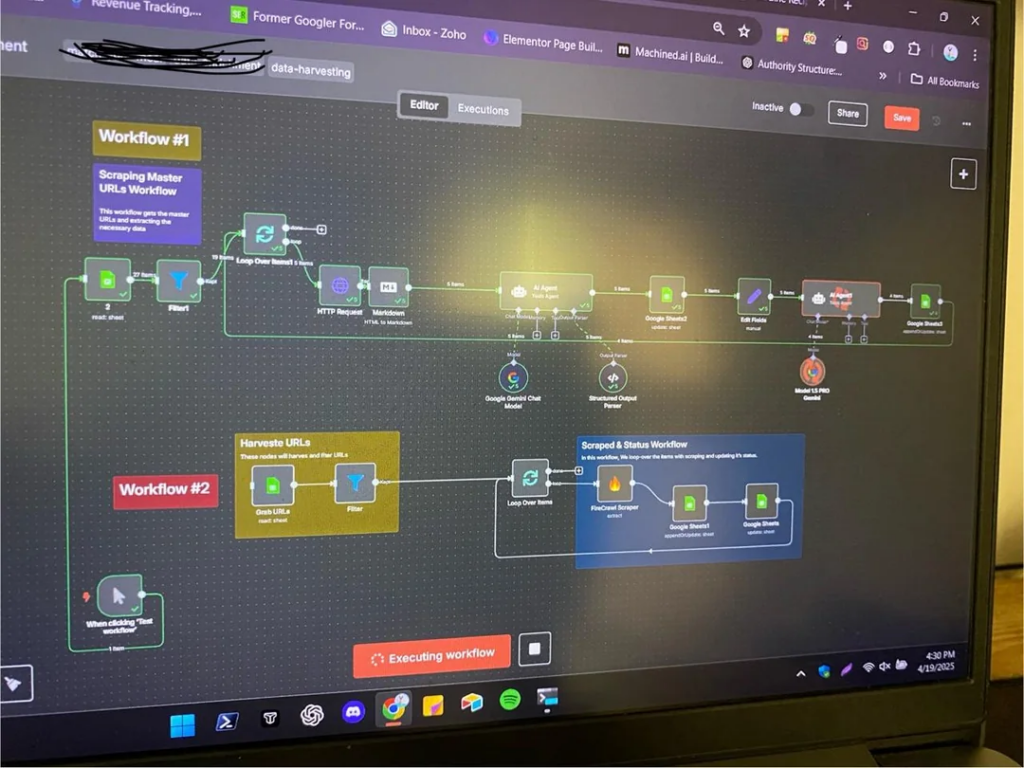
This is first time I ever posted a workflow on reddit, and I received 162k views and 400+ upvotes. I think this is 10 months ago, and I used first time ever Loop over items.
How n8n Actually Processes Multiple Items?
Most n8n nodes process ALL items automatically. That’s built into how n8n works.
Say you pull 100 rows from Google Sheets. Each row becomes an “item” in n8n. When that data hits your next node, maybe a slack node that post messages. n8n automatically runs that Slack node 100 times. One message per item.
You don’t build a loop. You don’t configure anything special. It just happens.
This is different from Make.com(formerly Integromat). In Make, use an iterator to process items one by one through entire workflow.
In n8n, each node processes all items, then passes results to next node.
Most beginners (past me) assume they need Loop over items because that’s how worked in Make. They actually don’t. n8n already handles it.
You can see this for yourself.
- Manual trigger
- Code node that create 5 test items
- Another code node that add fields to each item
Run it, look at the output. You’ll see 5 items, all processed, no loop needed.
The 3 Scenarios Where You Need Loop
Scenario #1: Rate Limiting & API Throttling
APIs limit how many requests you can make per minute. Gmail allows 100 emails per minute. Most APIs cap at 60-120 requests per minutes. Some are trickier.
If you’ve 500 items and n8n’s default behavior processes them all at once, you’ll hit that limit. Your workflow fails. The APIs returns error, sometimes it process, other’s don’t.
Solution
- Option 1: You need to add wait (1 minute) to the end of node.
- Option 2: Batch your items 1 or 10. (totally depends on your requirement)
If you’re calling external APIs for many items, you probably need this. Everything else in n8n handles multiple items automatically, but external APIs don’t care about n8n architecture – They’ll block you for too many requests.
For more advanced rate limiting patterns: How to handle API Rate limits in n8n
Scenario #2: Node Exceptions (Nodes that Don’t Auto Loop)
Some nodes only process the first item by default design. It’s not a bug, and it’s how those specific nodes work.
The most common example: RSS Feed Read Node
You give it an array of 5 RSS URLs. Most nodes would fetch all 5 feeds. RSS feed read node? Only fetches the first one and ignore the rest.
Why? The RSS Feed read node expects a single URL, fetches the feed, and returns multiple items (contents). It’s designed for “One feed in, many contents out” – not “many feeds in”
If you need to read multiple RSS feeds, then you need to connect with Loop over items.
n8n’s official doc maintains a list of node exceptions. Before assuming thing up, check if you node is on that list.
Other nodes that might need loops
- Certain webhooks nodes that expects a single request
- Some database nodes with specific query patterns
- Custom nodes that process items differently
Scenario #3: Pagination with Unknown Page Counts
APIs that return paginated data sometimes don’t tell how many pages are exist.
They just say here “page 1”, “page 2” without revealing total pages.
well, let’s move on with a workflow here. This is going to be a little bit advanced workflow, and though you would need to understand these before you move to this workflow, otherwise you can still try it out with me and see whether you understood or else check it out the references here.
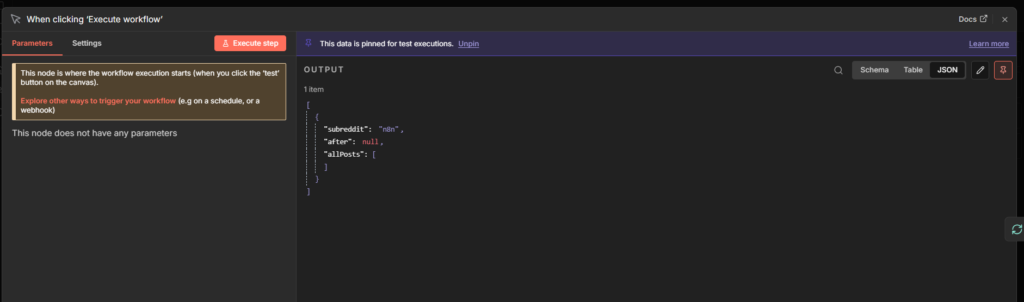
Create a workflow, and add a manual trigger. In the manual trigger, ping this object code.
[
  {
    "subreddit": "n8n",
    "after": null,
    "allPosts": []
  }
]
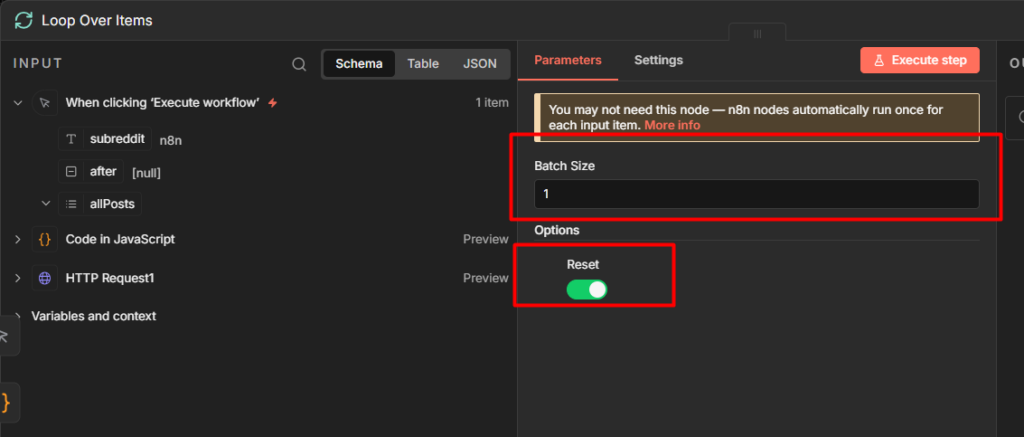
Once you pinned the object, then connect Loop Over Items node,
In the Loop node,
- Add the batch size into 1.
- Click on the option, and toggle to enable “Reset”
What is Reset option? This option controls whether the loop can restart with ew data or just run once with the original data.
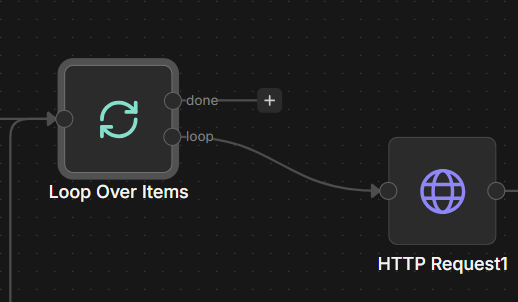
Now, you connect the loop output path to HTTP Request
Within the HTTP Request,
- Method: Get
- URL:
https://www.reddit.com/r/{{ $json.subreddit }}/hot.json
- Toggle to enable “query parameters”
- In query parameters
- Name: limit
- Value: 25
So what we are doing here is, we are going to send a request to n8n subreddit to fetch posts, and we are limiting to 25 posts, that’s why we are creating a limit = 25
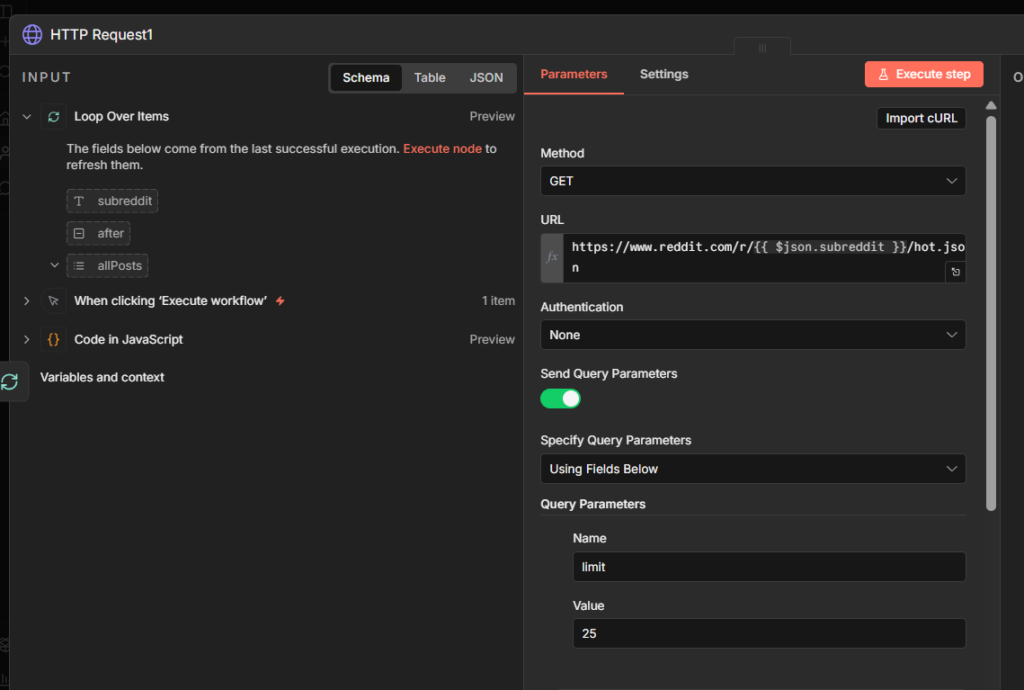
This is how it should look like. Please be make sure to compare your workflow with the image.
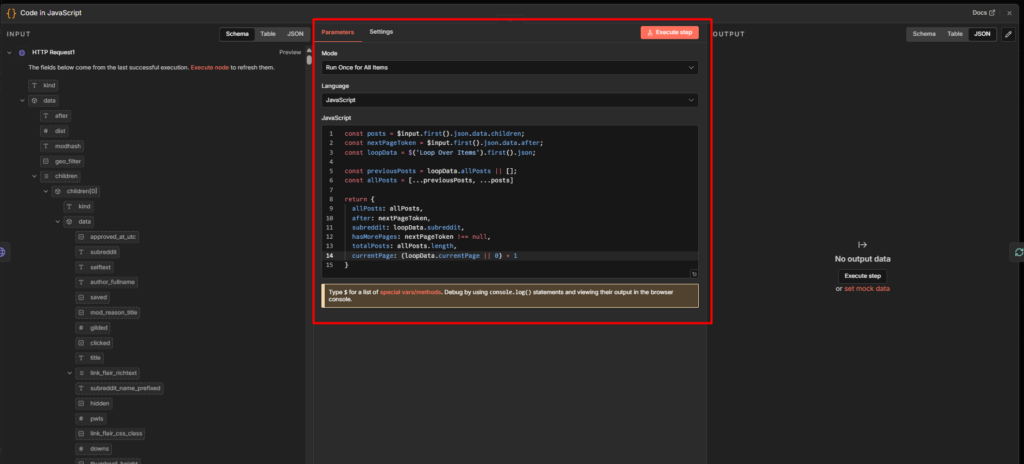
After that we are going to add a code node.
const posts = $input.first().json.data.children;
const nextPageToken = $input.first().json.data.after;
const loopData = $('Loop Over Items').first().json;

const previousPosts = loopData.allPosts || [];
const allPosts = [...previousPosts, ...posts]

return {
  allPosts: allPosts,
  after: nextPageToken,
  subreddit: loopData.subreddit,
  hasMorePages: nextPageToken !== null,
  totalPosts: allPosts.length,
  currentPage: (loopData.currentPage || 0) + 1
}
Code review: When the workflow starts, you begin with an empty bag (allPosts: []). you also have instructions on which sub-reddit to visit (subreddit: "n8n") and a note that says “start from the beginning” (after: null)
HTTP request node goes to reddit, and says “give me 25 posts from r/n8n starting from the beginning “.
Reddit responds with 25 posts AND a special ticket that says “if you want more posts, come back with this ticket: t3_abc123”
Now your Code node runs. It looks at three things.
- First: It grabs those 25 new posts.
- Second: It grabs that special ticket for getting more posts later
- Third: it checks your shopping bag to see what you already collected from previous trips. on the first tip, array is empty, on the second trip, your array has 25 posts, on the third trip, it has 50 posts.
Now we can fetch posts from reddit based on pagination by limiting.
Quick Troubleshooting
Loop processes the same item every time?
You’re using .first() inside the loop. This literally means “always grab the first item” – not the current one.
// ❌ Wrong - always returns first item
{{ $('Google Sheets').first().json.email }}

// ✅ Right - returns current item
{{ $json.email }}
Loop never stops?
You’re missing an exit condition. Every loop needs a way out. Like, we need to safety limit the fetches data. Make sure to test with small datasets first.
Quick Decision Flowchart
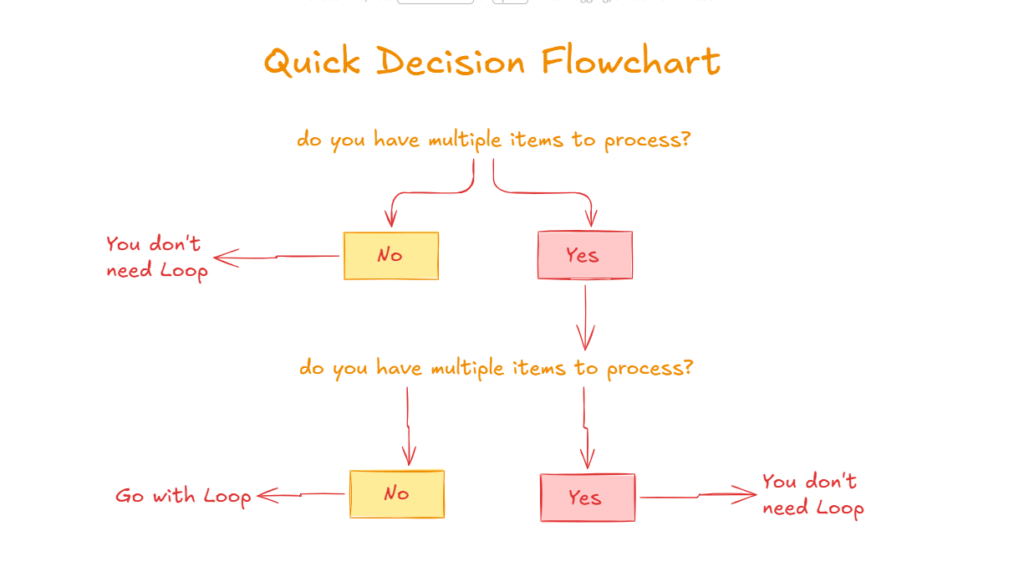
Use this every time you think you need Loop Over items
Start – Do you have multiple items to process?
- No – You don’t need any loop
- Yes – Next,
Does the next node automatically process all items?
- Yes – No Loop Over Items needed
- No – Next,
Check these 3 reasos
- Need rate limiting – Loop Over items with batch size + Wait node
- Node exception (RSS, etc) – Loop Over items with batch size 1
- Pagination scenario – Loop Over Items with reset option on.
- None of the above – reconsider workflow
Still not sure, Test without Loop over items first. If items 2-100 aren’t processing, then add it.
When to Skip Loop Over Items Entirely
You do NOT need Loop over items for,
- Standard data processing: Google Sheets, databases, Airtable – they all return multiple items. n8n processes them automatically.
- AI/LLM operations: OpenAI node, Claude node – they handle batching internally.
- Most HTTP requests: Unless the API specifically has rate limits you’re hitting, n8n will make all requests.
- Basic transformations: Code nodes, Set nodes, Filter nodes – all process multiple items by default.
- Email to small groups: Sending 50 emails? n8n handles it. Sending 500? Now you might need rate limiting.
- The rule: If you can’t explain in one sentence WHY you need Loop Over Items (using one of the three scenarios), you don’t need it.
Final Thoughts
Loop Over Items is powerful when you need it. But I’ve reviewed dozens of community workflows, and 80% of them have unnecessary Loop Over Items nodes, and some add another loop inside the main loop. I’ve zero idea, what they are trying to accomplish.
The pattern I follow is build without it first. Only add when I hit one of three situations – rate limit, node exceptions, or pagination
You workflow will be simpler. It will run faster. And when you DO need Loop over items, you’ll know exactly why.