
When I started my n8n journey, credentials weren’t an issue for me, it was all plug and play and everything seemed to work, then I stopped workflow for few weeks, and started the workflow again, then I got credential error. I was like! what! what just happened, then I had to re-authenticate to make it work.
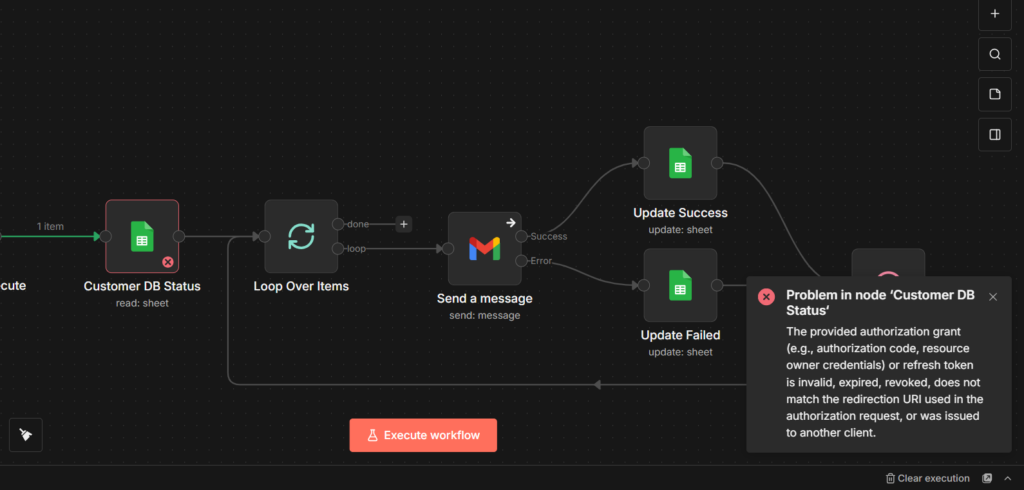
But, what if this issue constantly happen for n8n workflow builder occasionally, that’s pure annoyance. so the builder needs to rinse and repeat. So OAuth2 clients needs to be refresh it’s tokens.
This ain’t a bug in your workflow. It’s how OAuth2 access tokens work by default. They expire after 7 days. Everytime they expire, you need to manually re-authenticate it (This method considered as a fix, but it’s not efficient). For automated workflows that should run without any interruptions.
I’ve seen lots of users had posted their frustration “credentials expiring” in reddit, and community forums.
Alright, let’s fix this credentials expiring issue right now.
Why Do We Need Access & Refresh Tokens?
The Refresh token in Google OAuth2 for n8n acts as a long-term key that allows n8n to generate a short-term access key (access token) without requiring you to log in manually every hour.
Two Types of Tokens
- Access token: This is the actual key n8n uses to read your sheets or add google calendar events. For security purposes this key will expire after 1 hour.
- Refresh token: This is a special key stored securely in your n8n database. It has only one job, ask Google to get a new token if current refresh token expired.
Next thing, we are gonna see how does this actually works.
When you setting up credentials, This is what will happen.
- Initial Auth Process: You click “Sign in with Google” in n8n.
- Exchange: n8n sends your consent code to Google and requests
access_type=offline - Storage: Google sends back an Access token and a Refresh token. n8n saves both.
- Auto Renewal
- n8n attempts to run a node (e.g. Google sheet read)
- if Google replies
401 unauthorized(Token expired), n8n automatically pauses - n8n sends a Refresh token to Google
- Google validates it and return a new access token
- n8n retries the request seamlessly.
How to Fix Credentials Expiry Error?
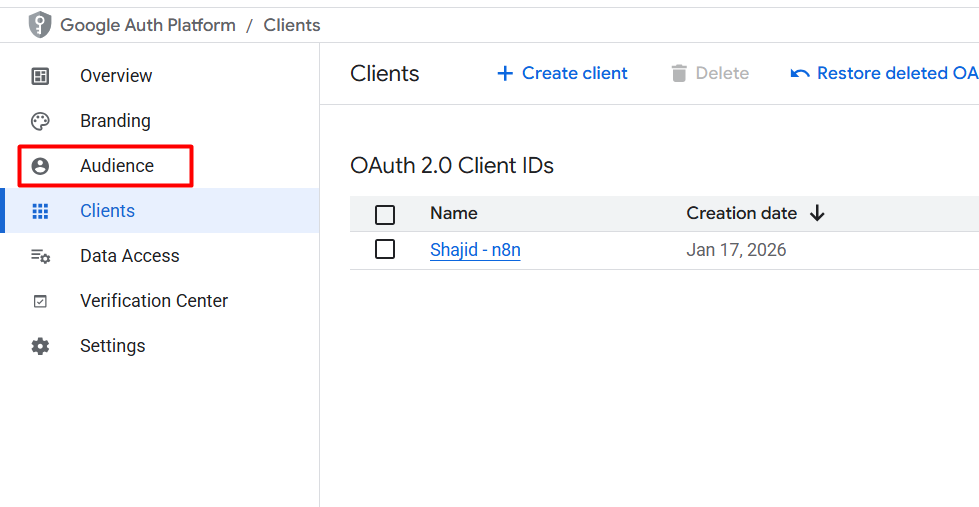
- Go to Google Cloud Console > oAuth Consent screen
- Navigate to Audience tab
- Click the button to Publish App (push to production)
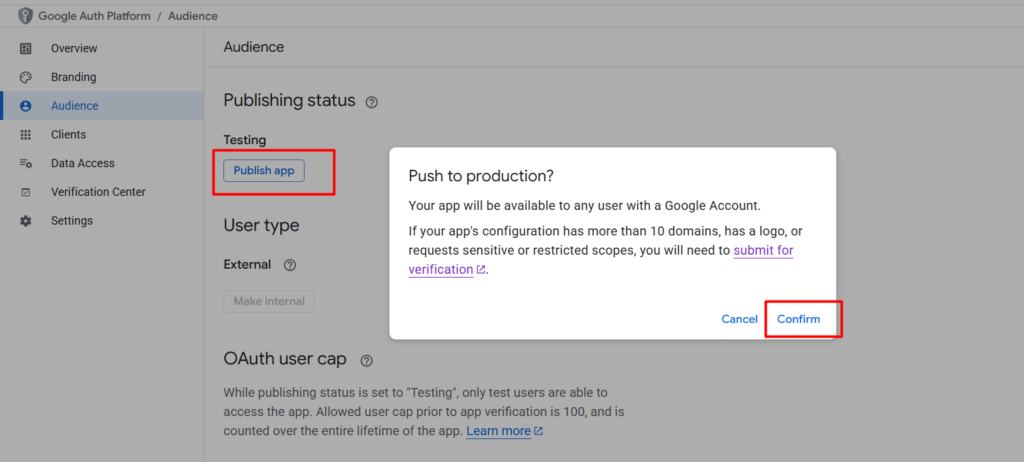
Note: You don’t need to submit your app for verification if you are only using it for yourself (using your own email address). However, you’ll see a warning screen says Google hasn’t verified this app, but you click advanced > Go to App(unsafe) to bypass it.
Configuration Checklist
To ensure the Refresh token mechanism work correctly, Your Google Cloud Console settings must match this criteria.
- Redirect URL: Must be exactly
https://[YOUR-N8N-DOMAIN]/rest/oauth2-credential/callbackorhttps://localhost:5678/rest/oauth2-credential/callback
- Scopes: if you add any new scopes (e.g., adding Gmail to an existing Drive credentials), the old Refresh token may become invalid. You must re-authenticate to generate a new one that covers all the updated scopes.
If you’re setting up n8n credentials for the first time or working with other services, Check our n8n credentials and service guide for step by step instructions across all the major platforms.
Your workflow should now run uninterrupted. No more weekly re-authenticate cycles.