
Why most beginners struggle with n8n (And, It’s not what you think).
You’ve finished the First Hello World Workflow. You understand what an HTTP Request node does. You know how to connect nodes together. But when you open n8n to automate something real – like monitoring Reddit mentions of your product, you literally freeze.
The canvas is blank. You know the tools exist, but you have no idea where to start.
Technical knowledge isn’t your problem. Workflow decomposition is.
Most n8n tutorials teach you what nodes do. They show you how to configure an HTTP Request or parse JSON. But they skip the most important skill – breaking down a problem into automation-friendly steps before you touch a single node.
I learned this the hard way after watching dozens of beginners (myself included) build workflows that technically work but are impossible to maintain. They skip planning, jump straight to adding nodes, and end up with spaghetti logic that breaks the moment anything changes.
This guide teaches you the thinking process that comes before the clicking. Once you understand how to decompose problems into workflow patterns, building in n8n becomes surprisingly straightforward.
The Workflow Thinking Framework
Before you add your first node, answer four questions. These questions force you to think like a workflow instead of like a human performing tasks manually.
Question 1: What’s the Desired Outcome?
Start with the end result, not the process to get there.
Bad example: “I want to scrape Reddit.”
Good example: “I want to receive a Slack notification when a new post in r/n8n mentions ‘workflow automation’ with 50+ upvotes.”
Can you see the difference? The good example is specific, measurable, and describes the actual value you’re creating. The bad example describes a technical action without context.
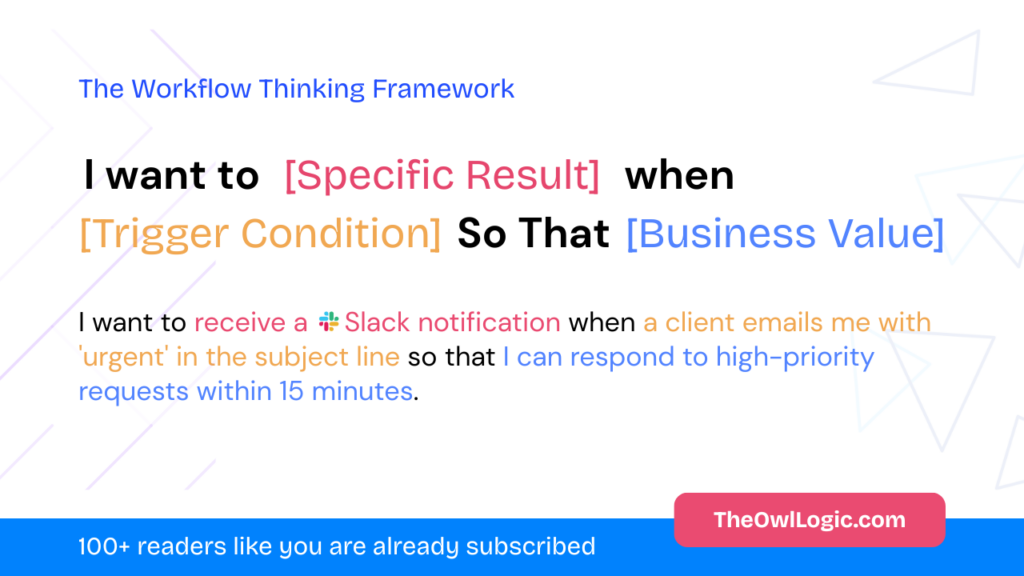
Write your desired outcome as: “I want to [specific result] when [trigger condition] so that [business value].”
This forces clarity. If you can’t fill in all three parts, your problem isn’t well-defined yet.
Question 2: What Triggers the Workflow?
Workflows need a starting point. In n8n, this is your trigger node, and choosing the wrong type creates problems later.
Ask yourself: Does this workflow start based on time, an external event, or a manual action?
Time-based triggers run on a schedule:
- “Every Monday at 9am, generate a weekly report”
- “Every 4 hours, check inventory levels”
- Use the Schedule Trigger node
Event-based triggers respond to something happening:
- “When a new email arrives in support”
- “When someone submits a form on your website”
- “When a file is added to Google Drive”
- Use service-specific trigger nodes or webhooks
Manual triggers start when you click a button:
- “I want to run this workflow on-demand”
- “I’m testing and want to control execution”
- Use the Manual Trigger node
Most beginners default to Manual triggers because they’re testing. That’s fine for development, but switch to the real trigger type before deploying. A workflow that should respond to events won’t work if it requires manual clicks.
Question 3: What Data Transformations Are Needed?
Every workflow follows the same pattern: Input → Transform → Output.
Input is the raw data from your trigger. It’s usually messy, contains extra fields you don’t need, and isn’t in the format the next step expects.
Transform is where you clean, filter, format, and enrich that data.
Output is what the next step (or final destination) needs.
Let’s use a real example. You’re pulling posts from Reddit’s API:
Input: 50 Reddit posts in JSON format, each with 20+ fields (author, created_utc, score, title, selftext, url, subreddit, etc.)
Transform:
- Filter to only posts with score > 100
- Extract just title and url
- Format as a readable message
Output: A clean list of high-scoring posts ready for your Slack node
This thinking process maps directly to n8n nodes. The transformation step might need multiple nodes, a Filter node to remove low-scoring posts, a Set node to extract specific fields, and a Code node if you need custom formatting.
Understanding how data flows between nodes makes this transformation step much clearer.
Question 4: What Could Go Wrong?
Beginners skip this question. Then their workflow runs fine for a week and suddenly breaks.
Think through failure modes before building:
What if the external API is down?
Your workflow should handle timeouts gracefully instead of failing silently. Maybe you send yourself an alert, or retry after 5 minutes.
What if no data matches your filters?
If you’re filtering Reddit posts for those with 100+ upvotes and none exist today, should your workflow fail? Or should it complete successfully with zero items?
What if data format changes?
APIs add new fields, remove old ones, or change data types. Your workflow should validate critical fields exist before using them.
I’ve seen workflows break because someone assumed an API always returns an array. One day it returned null, and the workflow crashed trying to loop over nothing.
Add error handling early. It’s easier than debugging production failures at 2am.
Three Mental Models for Common Automation Patterns
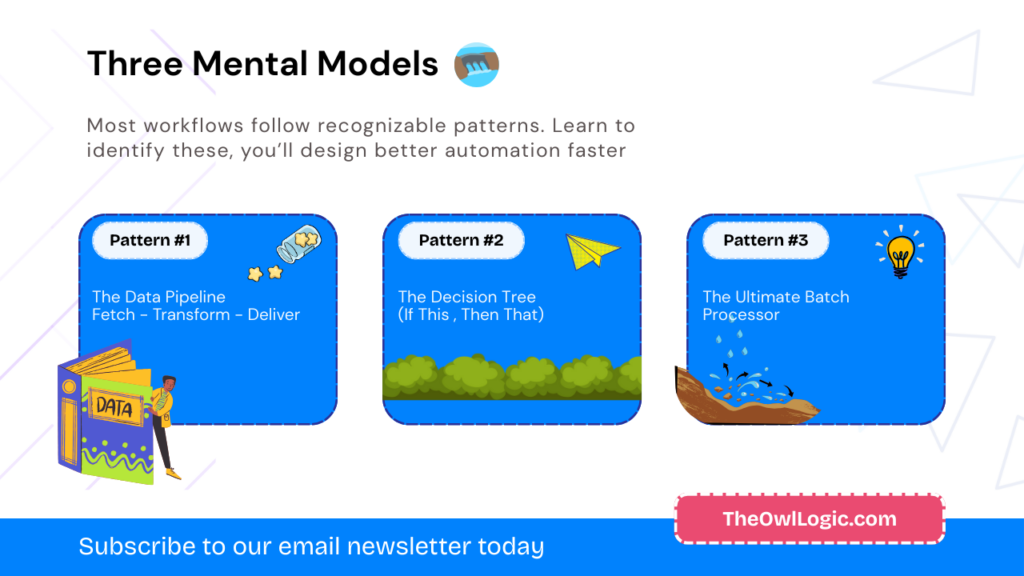
Most workflows follow recognizable patterns. Learn to identify these, and you’ll design better automations faster.
Pattern 1: The Data Pipeline (Fetch → Transform → Deliver)
When to use it: You’re moving data from one place to another with minimal logic in between.
This is the simplest pattern. Data flows in one direction through a series of transformations, then lands somewhere useful.
Example scenario: Send a daily weather report to Slack every morning at 8am.
The workflow structure:
- Schedule Trigger – Runs at 8:00am daily
- HTTP Request – Fetch weather data from OpenWeather API
- Set node – Extract temperature and conditions from the JSON response
- Code node – Format a readable message like “Today in San Francisco: 72°F, partly cloudy”
- Slack node – Send the formatted message to #general
No branching logic, no loops, no complex decision-making. Data enters at the top, gets transformed step by step, and exits at the bottom.
This pattern works well because it’s linear and predictable. When something breaks, you know exactly where to look—the step that’s failing.
Pattern 2: The Decision Tree (If This, Then That)
When to use it: Different inputs require different actions.
Real-world problems rarely have one-size-fits-all solutions. Support emails need different responses based on urgency. Sales leads need routing based on company size. File uploads need different processing based on file type.
Example scenario: Triage support emails and route them based on urgency.
The workflow structure:
- Email Trigger – New email arrives at [email protected]
- Code node – Analyze subject and body for keywords
- IF node – Branch into three paths:
- Path A: Email contains “urgent” or “down” → High priority
- Path B: Email contains “bug” or “error” → Medium priority
- Path C: Everything else → Low priority
- Different actions per path:
- High priority → Send Slack alert to on-call engineer
- Medium priority → Create ticket in system with priority flag
- Low priority → Send auto-reply, create normal ticket
The IF node is your friend here. Each branch handles its specific case independently. This is much clearer than trying to build one giant node that handles all scenarios.
Learn more about conditional logic in n8n to master this pattern.
Pattern 3: The Batch Processor (Loop Over Items)
When to use it: You need to perform the same action on multiple items, but each item needs individual processing.
This is where beginners often get stuck. They think “I have 100 contacts, I need to send 100 emails” and try to build a workflow that handles all 100 at once. That’s not how n8n works.
n8n processes items in batches automatically, but understanding how loops work prevents confusion.
Example scenario: Send personalized follow-up emails to 100 conference attendees.
The workflow structure:
- Schedule Trigger – Run once (manual or scheduled)
- Google Sheets node – Fetch all attendee data (name, email, company, session attended)
- Loop Over Items – n8n handles this automatically,
- For each attendee, the workflow processes them individually
- The Email node receives one attendee at a time
- Set node – Create personalized variables for each attendee
- Code node – Build custom email body: “Hi {{name}}, thanks for attending {{session}} at our conference…”
- Send Email node – Send to each attendee individually
- Wait node – Pause 2 seconds between emails to respect rate limits
The critical insight: n8n automatically loops over items from previous nodes. You don’t need to write a for-loop yourself. Each node processes all items it receives, one at a time.
But you do need to handle rate limits. If you’re sending 100 emails, most email services will throttle or block you if you send them all instantly. That’s where the Wait node saves you—or better yet, learn about handling API rate limits in n8n.
Practical Exercise: Design Your First Workflow (Before Opening n8n)
Here’s the mistake I see constantly: beginners open n8n, add a few nodes, realize they don’t know what comes next, and start over. Then they do it again. And again.
Stop doing that. Plan on paper first.
Use this pre-workflow checklist before touching your mouse:
1. Write the Problem in One Sentence
Use this template: “I want to [outcome] when [trigger] so that [benefit].”
Don’t cheat and make it vague. Be painfully specific.
Example:
“I want to save new videos from the Fireship YouTube channel to my Notion workspace when they’re published so that I have a curated learning library.“
2. Map the Data Flow
Answer three questions:
What data comes in?
- RSS feed from YouTube containing video title, URL, publish date, description
What transformations happen?
- Filter out YouTube Shorts (keep only videos longer than 60 seconds)
- Extract just the title, URL, and publish date
- Format publish date from ISO 8601 to readable format
What data goes out?
- Clean database entry in Notion with Title, URL, Date Added fields
This step forces you to think about data types and formats. An RSS feed gives you different data than a direct API call. Notion expects data in a specific format. Understanding this before building saves hours of debugging.
3. Identify Your Pattern
Which pattern does this match?
- Data Pipeline – Fetch → Transform → Deliver (linear flow, no complex logic)
- Decision Tree – Different actions based on conditions
- Batch Processor – Same action on multiple items
Our YouTube-to-Notion example is a Data Pipeline with filtering.
4. List Required Nodes (But Don’t Open n8n Yet!)
Based on your pattern and data flow, write down which nodes you’ll need:
- RSS Feed Trigger (fetch YouTube feed)
- Filter node (remove Shorts)
- Set node (extract specific fields)
- Code node (format date – optional, could use expressions)
- Notion node (create database entry)
Notice I wrote “optional” for the Code node. This is thinking through alternatives. n8n expressions might handle date formatting without custom code.
5. Anticipate One Failure Point
What’s the most likely thing to break?
In our example: YouTube’s RSS feed could be down, return empty results, or change their data structure.
How would we handle it?
Add an IF node after the RSS Trigger. If the feed returns zero items or errors, send yourself a Slack notification instead of trying to create empty Notion entries.
Now Open n8n and Build It
Here’s what will happen: You’ll build the workflow in 10 minutes instead of an hour because you’ve already solved the hard problems. You’re translating a plan into nodes, not designing while building.
When you get stuck, you’ll know exactly where the problem is. Your plan said “filter out Shorts,” so if that’s not working, you know the Filter node configuration is wrong—not your entire approach.
Common Thinking Traps (And How to Avoid Them)

Trap 1: “I’ll Figure It Out As I Go”
This leads to workflow spaghetti. You add nodes reactively, realize you need something earlier, insert nodes in the middle, and end up with a tangled mess.
Solution: Spend 5 minutes planning before adding your first node. Use the pre-workflow checklist above. I promise you’ll save 30 minutes of confused clicking.
Trap 2: “This Needs to Be Perfect”
Analysis paralysis kills momentum. You research every possible approach, read documentation for hours, and never build anything.
Solution: Build the MVP workflow first. Get it working with the simplest possible approach, even if it’s not elegant. You can always optimize later. A working workflow that’s ugly is infinitely more valuable than a perfect workflow that doesn’t exist.
Trap 3: “I Need a Node for Everything”
n8n has hundreds of nodes, but you don’t need to master them all. Sometimes a Code node with 5 lines of JavaScript is simpler than finding the perfect specialized node.
Solution: Use Code nodes for simple transformations. String manipulation, date formatting, basic math—these are often clearer as explicit code than as complex expressions or chains of Set nodes.
Trap 4: “It Works, Ship It!”
Your workflow runs successfully once, so you deploy it to production. Then it breaks in the first week because you didn’t handle errors.
Solution: Add error handling before deploying. Test failure scenarios intentionally:
- What if the API returns an error?
- What if you get zero results?
- What if the data format is unexpected?
Workflows that handle errors gracefully are the difference between a helpful automation and a maintenance nightmare.
Next Steps: Apply This to Real Automation
You now have a mental framework for designing workflows. Don’t just read this and move on and apply it.
Your assignment:
Pick one boring task you do manually every day or week. It doesn’t need to be complex. In fact, start simple.
Examples:
- Save attachments from specific emails to a folder
- Post your new blog articles to Twitter automatically
- Track product mentions on Reddit
- Generate a weekly summary of Slack messages
Apply the 4-Question Framework:
- What’s the desired outcome? (Be specific)
- What triggers the workflow? (Time, event, or manual)
- What transformations are needed? (Input → Transform → Output)
- What could go wrong? (Anticipate one failure)
Choose your pattern (Pipeline, Decision Tree, or Batch Processor).
Then build it.
Start with automating boring tasks in n8n if you need practical examples, or browse the full n8n tutorial series for specific node guidance.
The difference between beginners who struggle and those who succeed isn’t technical skill. It’s this: successful automation builders think through the workflow before they build the workflow.
You just learned how to think like a workflow. Now go automate something.